Experience

Our Top Rated Projects
School Project

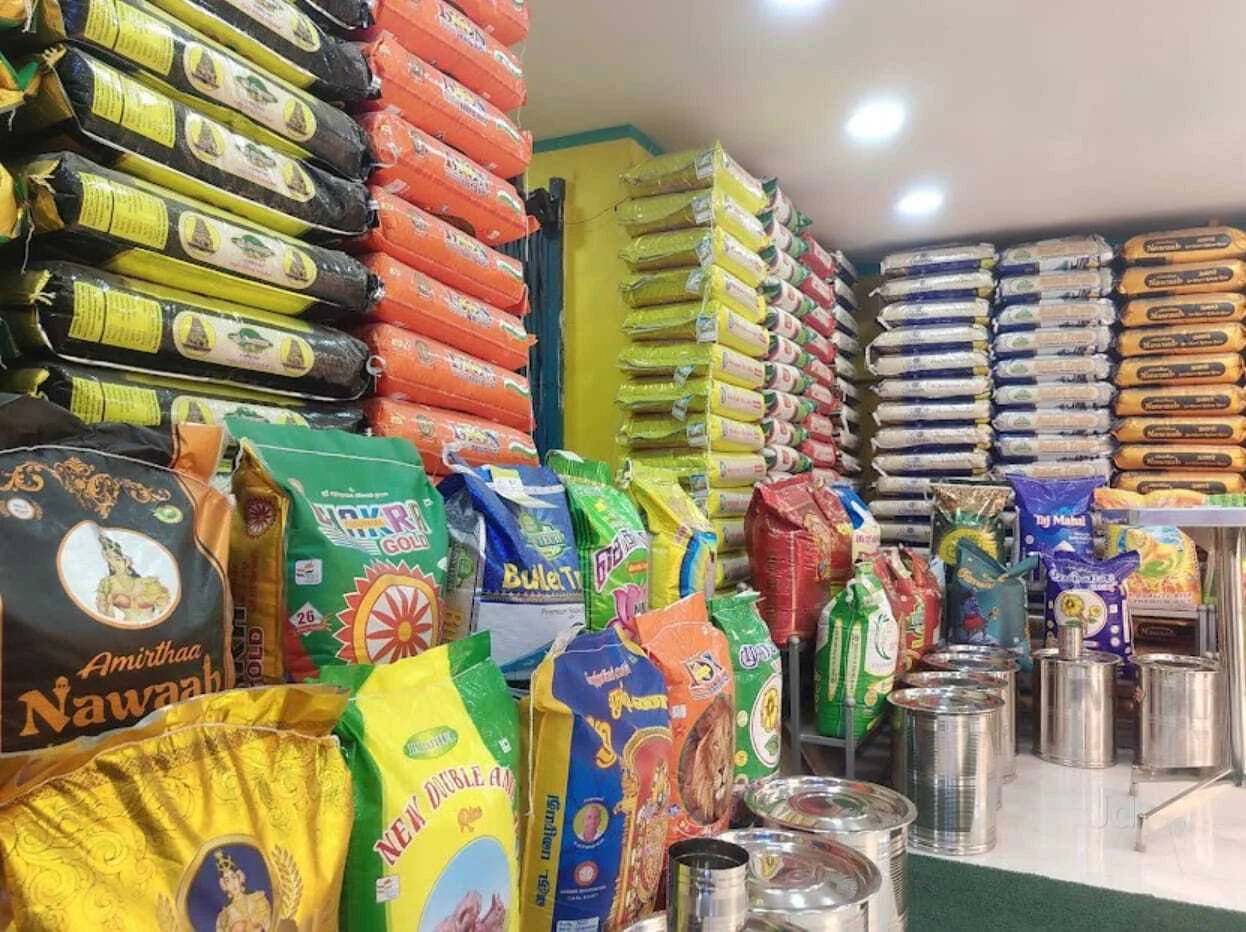
Rice Shops Software

Modern software design for rice shop sales and stock control.

Hotel Project

Rice Shellers And Processing Unit

Clean corporate software for shellers and reporting solution.

Software

Features and Functionalities

Login Page

Login page is designed with a secure and user-friendly interface to ensure safe access to the system dashboard. The login form includes three essential input fields: Username, Password, and Fiscal Year, allowing users to access their business data according to the selected financial period. The system is built with strong authentication logic—if an incorrect username or password is entered, the user will not be redirected to the dashboard and an error message will be displayed to prevent unauthorized access. Upon entering valid login credentials, the system successfully verifies the user and redirects them to the main dashboard. This secure ERP login system enhances data protection, business management efficiency, and overall software reliability, making it an ideal solution for modern rice shop management.

Login Screen
View Image

Dashboard
View Image

Dashboard

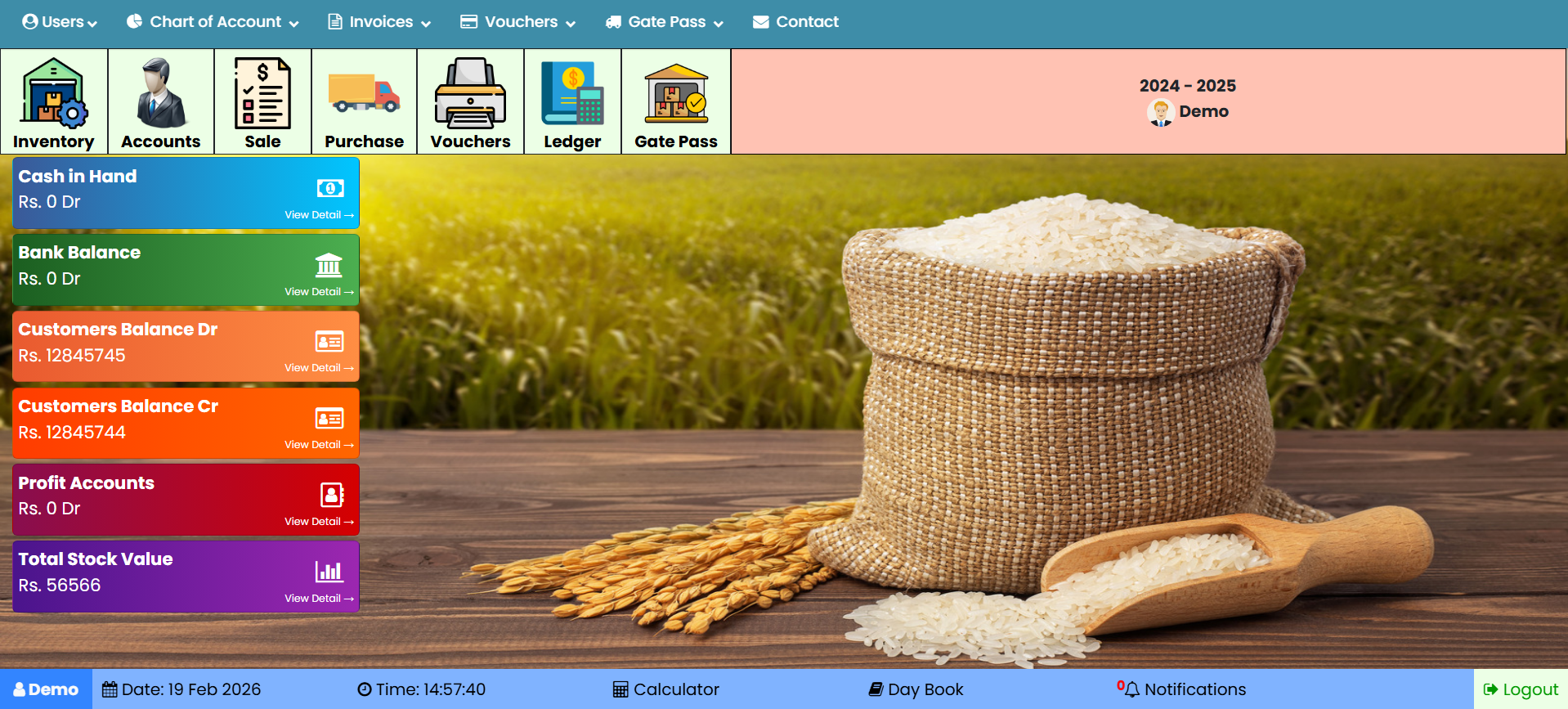
The dashboard is designed to streamline daily operations for rice mills and trading businesses with powerful ERP features. It includes user management for secure access control, a comprehensive chart of accounts to manage clients and financial records, and integrated sales and purchase invoicing for accurate billing. The system also supports day book entries and voucher management to maintain transparent daily transactions. Stock management features provide item-wise and store-wise inventory reports along with gate pass integration for stock movement control. Real-time financial insights such as cash in hand, bank balance, customer debit and credit balances, profit accounts, and total stock value ensure complete financial visibility. With built-in notifications, calculator, date and time tracking, and secure logout functionality, this dashboard delivers an efficient, reliable ERP solution for growing businesses.


Accounts Summary

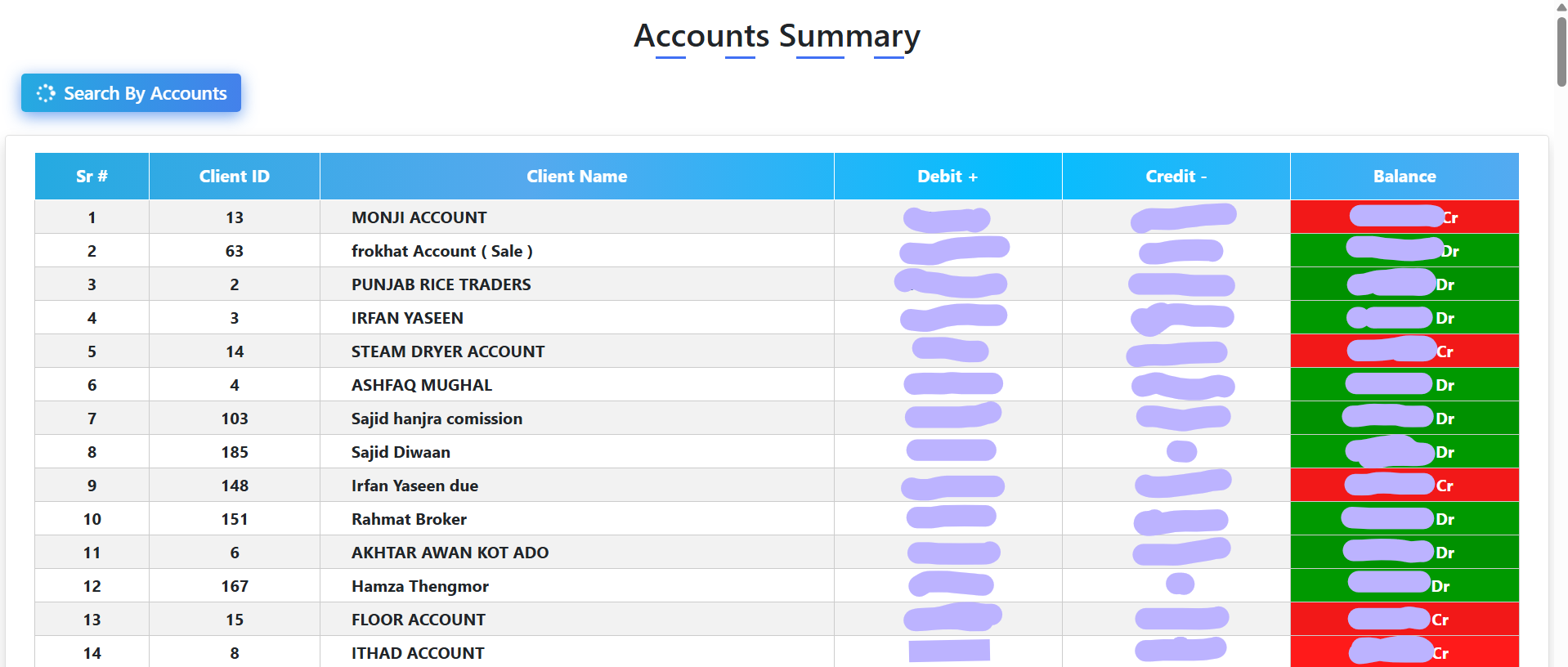
Accounts Summary module provides a structured overview of all client financial records with serial numbers, client IDs, and client names for organized account management. It displays debit, credit, and running balance details to ensure accurate tracking of customer transactions. For privacy and data protection purposes, sensitive financial figures can be securely hidden to maintain client confidentiality. The system includes a complete customer ledger card that records daily transactions with detailed debit and credit entries. In addition, it offers monthly and yearly consolidated account summaries for comprehensive financial analysis. This feature ensures transparent accounting, secure data handling, and efficient financial reporting for modern ERP-based business management systems.

Accounts
View Image

Stock
View Image

Stock Summary

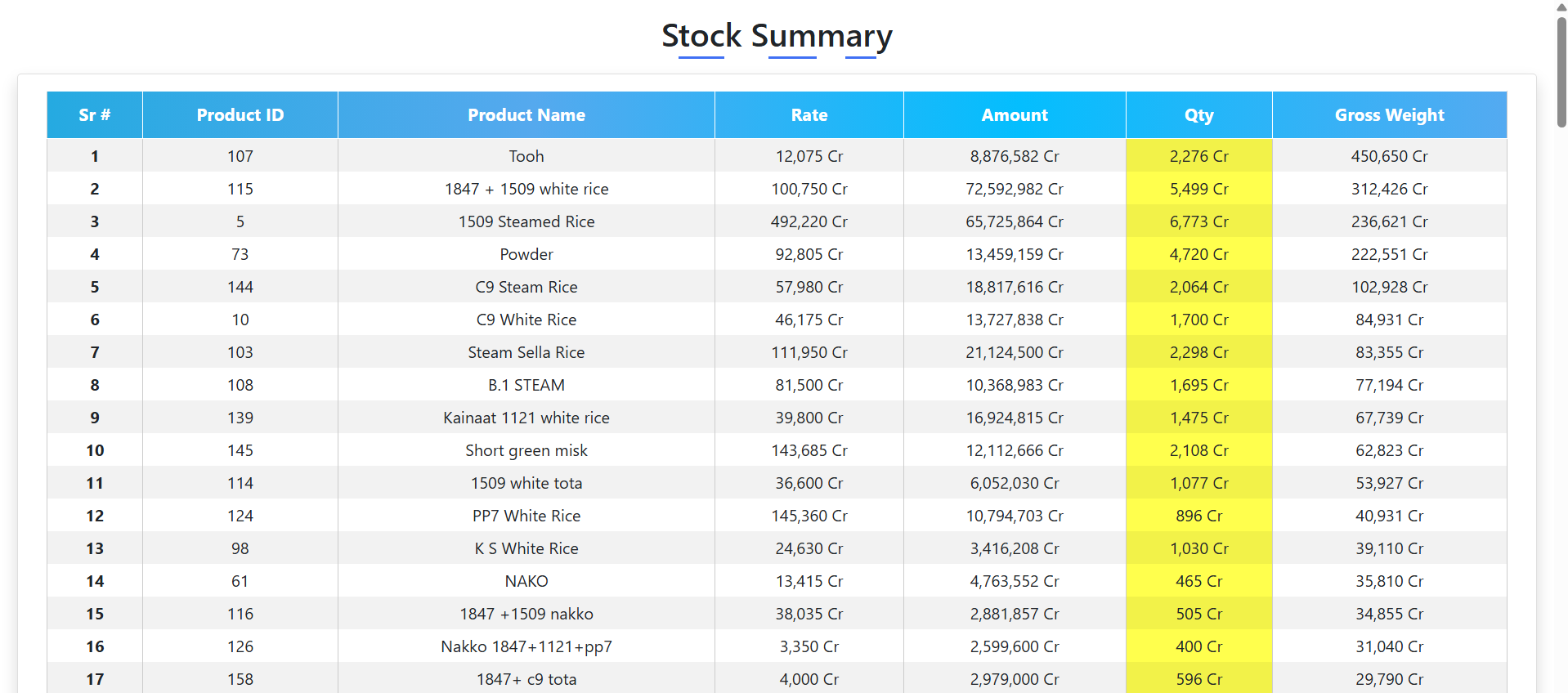
Stock Summary module provides a complete product-wise inventory management system for rice mills and trading businesses. It displays serial numbers, product IDs, product names, rates, quantities, gross weight, and total amounts for accurate stock tracking. The system maintains daily, monthly, and previous records to ensure full inventory history and transparency. Businesses can easily monitor quantity movements, price fluctuations, and stock valuation in real time. With detailed reporting and structured data management, this feature enhances inventory control, financial accuracy, and overall ERP efficiency.


Sale Invoice Part 1

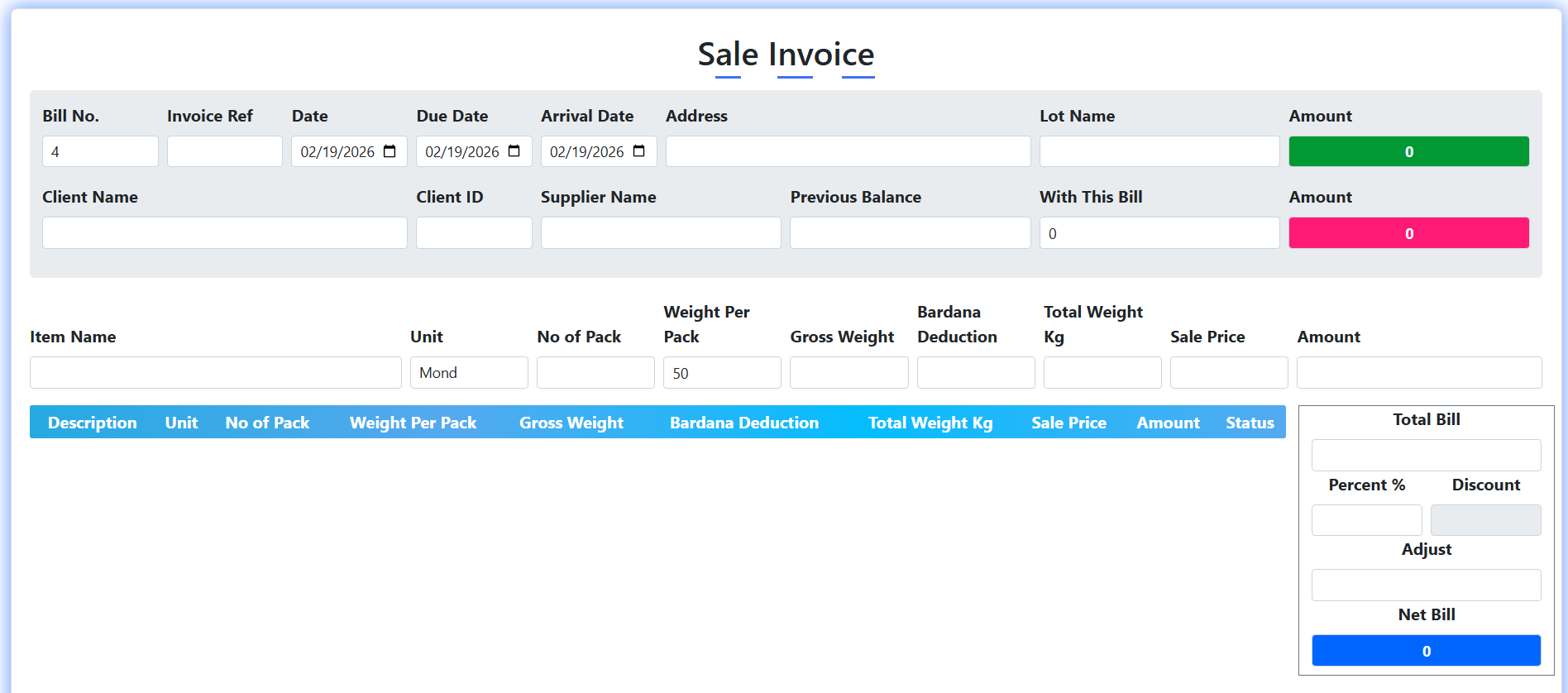
Sales Invoice module is designed to generate accurate and professional sales bills with automated client data integration. When a client is selected, the system automatically displays the customer’s address and previous balance, ensuring efficient and error-free billing. Users can manually enter item details, including number of packs, while unit selection and weight per pack calculations are handled automatically. The system calculates gross weight, deductions, and total weight, and instantly generates the amount once the sale price is entered. Multiple items can be added dynamically to the invoice table, with the total bill updating in real time. Additional discount percentages and adjustments can be applied to automatically calculate the final net bill, making it a powerful and user-friendly ERP sales invoicing solution.

Sale
View Image

Sale
View Image

Sale Invoice Part 2

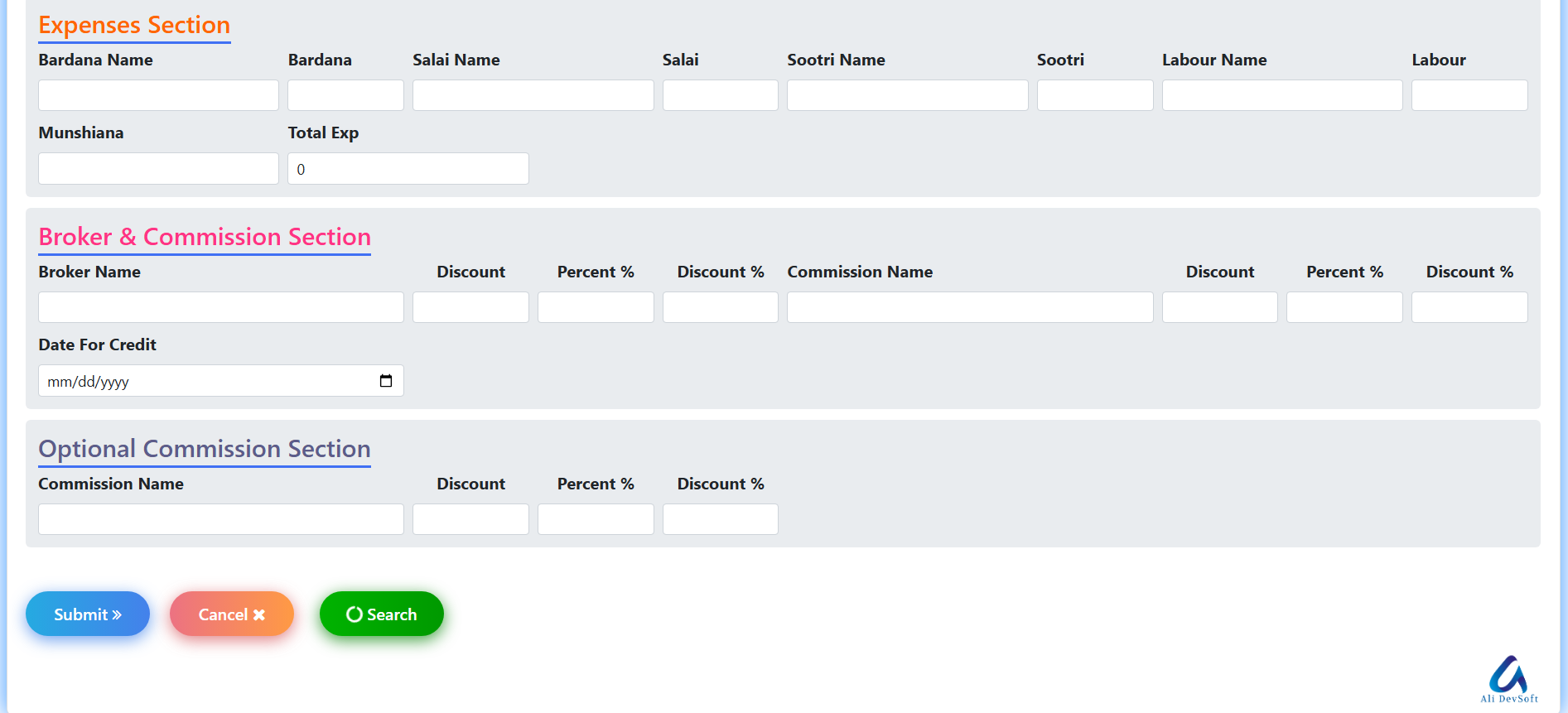
Sales Invoice – Part 2 module provides advanced transaction details and expense management for accurate financial control. The details section captures essential logistics information, including driver name, vehicle number, gate pass reference, and additional transport references to ensure complete delivery tracking. The expenses section records bardana, stitching, paper, labor, and other operational costs, which are automatically calculated into the total expense. The broker and commission section allows manual or percentage-based discount and commission entries for flexible financial adjustments. An additional optional commission section provides further customization with both manual and percentage-based inputs. All expenses and commissions are automatically added to the debit amount, ensuring precise cost calculation and transparent ERP-based sales accounting.

Purchase Invoice Part 1

Purchase Invoice module is designed to generate accurate and professional purchase bills with automated client data integration. When a client is selected, the system automatically displays the customer’s address and previous balance, ensuring efficient and error-free billing. Users can manually enter item details, including number of packs, while unit selection and weight per pack calculations are handled automatically. The system calculates gross weight, deductions, and total weight, and instantly generates the amount once the sale price is entered. Multiple items can be added dynamically to the invoice table, with the total bill updating in real time. Additional discount percentages and adjustments can be applied to automatically calculate the final net bill, making it a powerful and user-friendly ERP purchase invoicing solution.

Purchase
View Image

Purchase
View Image

Purchase Invoice Part 2

Purchase Invoice – Part 2 module provides advanced transaction details and expense management for accurate financial control. The details section captures essential logistics information, including driver name, vehicle number, gate pass reference, and additional transport references to ensure complete delivery tracking. The expenses section records bardana, stitching, paper, labor, and other operational costs, which are automatically calculated into the total expense. The broker and commission section allows manual or percentage-based discount and commission entries for flexible financial adjustments. An additional optional commission section provides further customization with both manual and percentage-based inputs. All expenses and commissions are automatically added to the debit amount, ensuring precise cost calculation and transparent ERP-based purchase accounting.


Vouchers OR DayBook

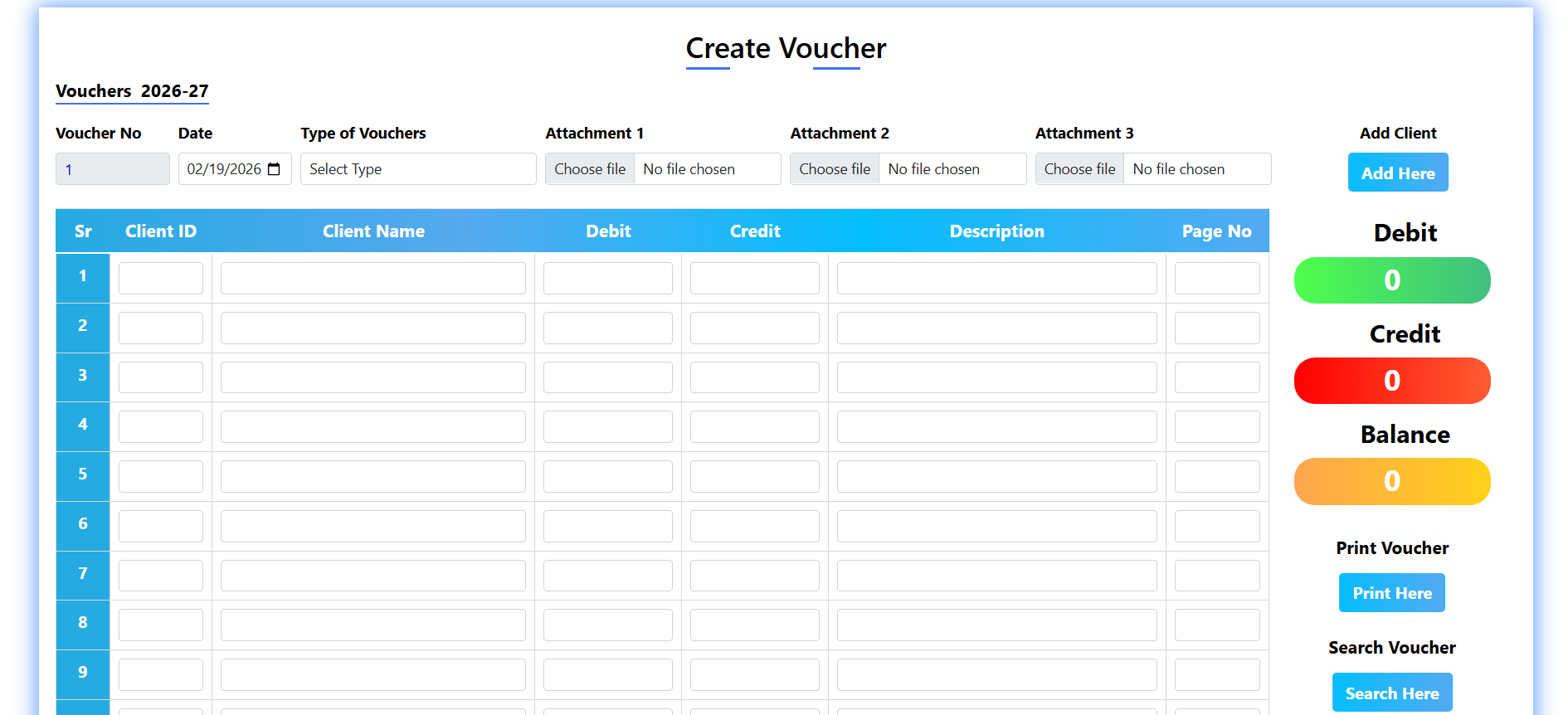
Vouchers OR DayBook module is designed to create and manage financial transactions efficiently with complete accuracy. It displays voucher number, date, and allows users to select different voucher types as required. Users can upload up to three attachments for proper documentation and record keeping. The system automatically syncs Client ID and Client Name, so selecting one will auto-fill the other. Debit and Credit amounts are calculated in real-time, and totals are automatically balanced and displayed clearly in the balance section. Users can also add detailed descriptions for each transaction to maintain transparency. Additionally, it provides options to Add Client, Print Voucher, and Search Voucher for easy record management and smooth workflow.

Voucher
View Image

Contact
View Image

Contact Us

Contact includes the owner’s name, phone numbers, email addresses, and website information. All details are structured properly to ensure easy reading and quick access. The layout is designed to present information in a clean and professional manner. Each contact method is clearly labeled for better user understanding. This section helps visitors quickly find the necessary communication details. It enhances credibility and makes connecting with the business simple and efficient.